- Posts: 8
- Thank you received: 0


How to run module
- rafalch
- Topic Author
- Offline
- New Member
-

Less
More
14 years 6 months ago #4480
by rafalch
How to run module was created by rafalch
I installed the module. How to run the module and how to enter the module? Displays a window where the video transmission?
Please Log in or Create an account to join the conversation.
- admin
-

- Offline
- Administrator
-

- Coding is good
14 years 6 months ago #4481
by admin
Replied by admin on topic Re: How to run module
Hello,
Did you have read the module documentation ? :
www.joomlarulez.com/download/doc_download/21-doc-jw-player-module.html
Did you have read the module documentation ? :
www.joomlarulez.com/download/doc_download/21-doc-jw-player-module.html
Please Log in or Create an account to join the conversation.
- rafalch
- Topic Author
- Offline
- New Member
-
Less
More
- Posts: 8
- Thank you received: 0
14 years 6 months ago #4483
by rafalch
Replied by rafalch on topic Re: How to run module
I have read.
I do not know how to run the module to use it. I have installed the module. And then what?
I do not know how to run the module to use it. I have installed the module. And then what?
Please Log in or Create an account to join the conversation.
- admin
-
- Offline
- Administrator
-
- Coding is good
14 years 6 months ago #4484
by admin
Replied by admin on topic Re: How to run module
Then like any other joomla module :
1 - edit the module
2 - assign the module to a template position
3 - publish the module
4 - save and verify it is display correctly where you want it to be
once done you have to re edit the module and configure it with your needs, for that i can help you but i need more information --> what you want to do with the module (youtube ? local steaming ? remote streaming ? playlist ? ect ect)
1 - edit the module
2 - assign the module to a template position
3 - publish the module
4 - save and verify it is display correctly where you want it to be
once done you have to re edit the module and configure it with your needs, for that i can help you but i need more information --> what you want to do with the module (youtube ? local steaming ? remote streaming ? playlist ? ect ect)
Please Log in or Create an account to join the conversation.
- rafalch
- Topic Author
- Offline
- New Member
-
Less
More
- Posts: 8
- Thank you received: 0
14 years 6 months ago - 14 years 6 months ago #4485
by rafalch
Replied by rafalch on topic Re: How to run module
Streaming RTMP with Wowza
I have a Wowza server. I want to share streaming to clients.
I do not know Joomla. For this I do not understand how this module starts. I'd like to buy it as it will work.
I have a Wowza server. I want to share streaming to clients.
I do not know Joomla. For this I do not understand how this module starts. I'd like to buy it as it will work.
Last edit: 14 years 6 months ago by rafalch.
Please Log in or Create an account to join the conversation.
- admin
-
- Offline
- Administrator
-
- Coding is good
14 years 6 months ago #4488
by admin
Replied by admin on topic Re: How to run module
1 - did you have publish the module as explain before ?
2 - if yes, did you know your rtmp url ?
2 - if yes, did you know your rtmp url ?
Please Log in or Create an account to join the conversation.
- rafalch
- Topic Author
- Offline
- New Member
-
Less
More
- Posts: 8
- Thank you received: 0
14 years 6 months ago - 14 years 6 months ago #4489
by rafalch
Replied by rafalch on topic Re: How to run module
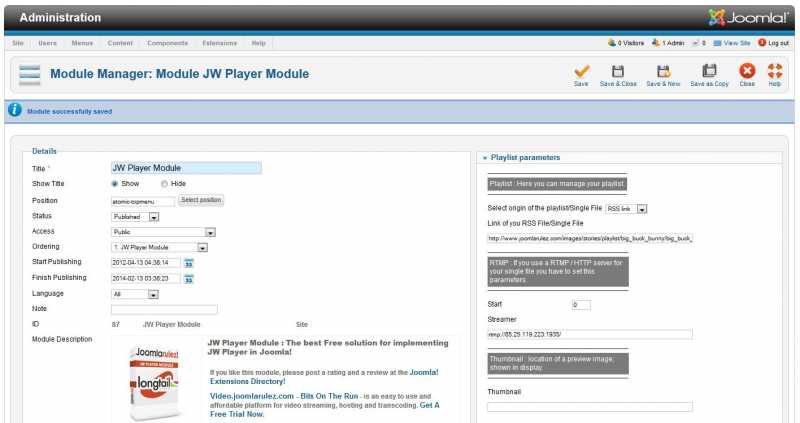
did you have publish the module as explain before?
Yes
2 - if yes, did you know your rtmp url?
I have an RTMP
Yes
2 - if yes, did you know your rtmp url?
I have an RTMP
Last edit: 14 years 6 months ago by rafalch.
Please Log in or Create an account to join the conversation.
- admin
-
- Offline
- Administrator
-
- Coding is good
14 years 6 months ago #4490
by admin
Replied by admin on topic Re: How to run module
1 - Set the list "origin of your playlist/single file" to single file
2 - Put in the field "Link of your rss file/sinlge file" the name of your file
3 - Put in the field "Streamer" the rtmp url (whto the name of the file, we only need the url of the application sofware as the file is set just below)
2 - Put in the field "Link of your rss file/sinlge file" the name of your file
3 - Put in the field "Streamer" the rtmp url (whto the name of the file, we only need the url of the application sofware as the file is set just below)
Please Log in or Create an account to join the conversation.
- rafalch
- Topic Author
- Offline
- New Member
-
Less
More
- Posts: 8
- Thank you received: 0
14 years 6 months ago #4491
by rafalch
Replied by rafalch on topic Re: How to run module
I have it set.
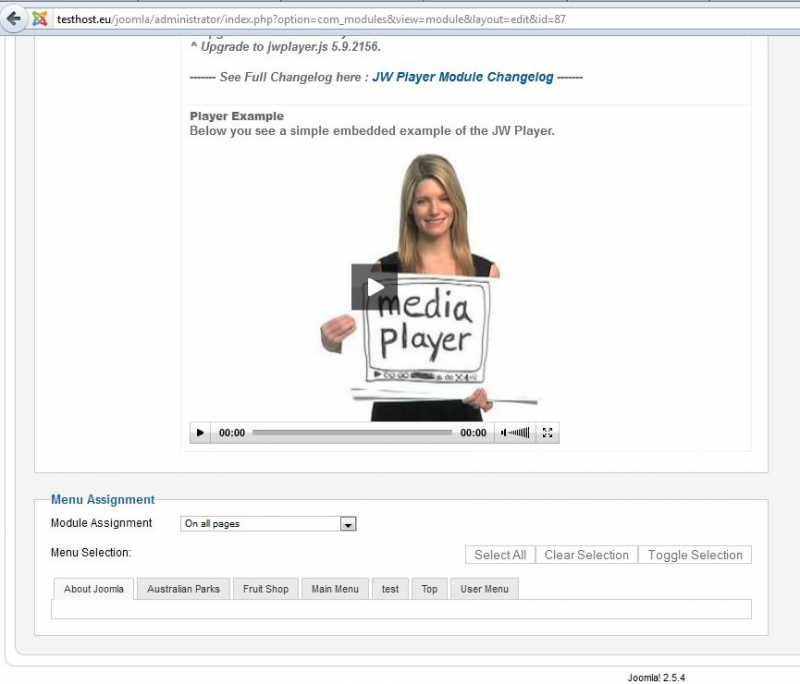
And what is displayed on the picture of streaming TV?
Do I need to install an additional module.
Sorry, but I do not understand.
This is an example of a plant?
Are there any detailed descriptions with photos?
And what is displayed on the picture of streaming TV?
Do I need to install an additional module.
Sorry, but I do not understand.
This is an example of a plant?
Are there any detailed descriptions with photos?
Please Log in or Create an account to join the conversation.
- admin
-
- Offline
- Administrator
-
- Coding is good
14 years 6 months ago #4493
by admin
Replied by admin on topic Re: How to run module
1 - did you the player play your stream when you click on play ?
2 - when you talk about the picture, did you talk about the default thumbs when the player is not playing the stream ?
if yes you can set it by putting a url to this default thumb in the field "thumbnail".
(There is explanation how to set up the module in the documentation, search for rtmp paragraph.)
2 - when you talk about the picture, did you talk about the default thumbs when the player is not playing the stream ?
if yes you can set it by putting a url to this default thumb in the field "thumbnail".
(There is explanation how to set up the module in the documentation, search for rtmp paragraph.)
Please Log in or Create an account to join the conversation.
Time to create page: 0.235 seconds
Download


Login Form
Random
-
-
-
Shopping Page
Uncategorised 17.Apr -
-
Popular
-
JW Player Advanced
15.Apr -
Shopping Page
17.Apr -
-
-
Refund Policy
19.Jul
Recently Updated
-
JW Player Advanced
Latest 15.Apr -
-
Subscription Plan Map
Faq 19.Jul -
-
Bento Advanced Plugin
Latest 26.Dec
Copyright © 2026 Joomla RuleZ. All Rights Reserved.
Joomla! is Free Software released under the GNU General Public License.
Disclaimer
Joomlarulez and this site is not affiliated with or endorsed by The Joomla! Project™. Any products and services provided through this site are not supported or warrantied by The Joomla! Project or Open Source Matters, Inc. Use of the Joomla!® name, symbol, logo and related trademarks is permitted under a limited license granted by Open Source Matters, Inc.